

I finally pulled a photo album out of the cabinet this weekend. I wasn’t looking for anything in particular. Then I opened it, and there was my high school lava lamp. Three whole pages of it. Next to some random neighborhood fireworks I can’t even place anymore.
That’s when the project clicked: we need to digitize every old photo we own. It’s less dramatic than a renovation — nobody’s going to film a before-and-after of a photo album — but it’s the kind of thing I’ve been meaning to tackle for years.

So this is Part 1. I’m documenting the whole process as it happens, testing a few different digitization methods, and sharing everything that works (and what doesn’t). The follow-up post with results, recommendations, and price comparisons is coming once I’m done. For now: the plan.
Why digitize old photos in the first place
Three reasons, and none of them are about being neat-freaky.
1. Safeguard memories. Physical photos are fragile. A house fire, a flood, or just plain time will do them in. Backing everything up to a cloud photo service like Google Photos means the memories survive even if the originals don’t.
2. Free up storage space. Our old albums are bulky — they’re more than four times thicker than the slim photobooks we make from sites like Blurb. Converting older pictures into slimmer photobooks frees up shelf space for games, keepsakes, and future photobooks.
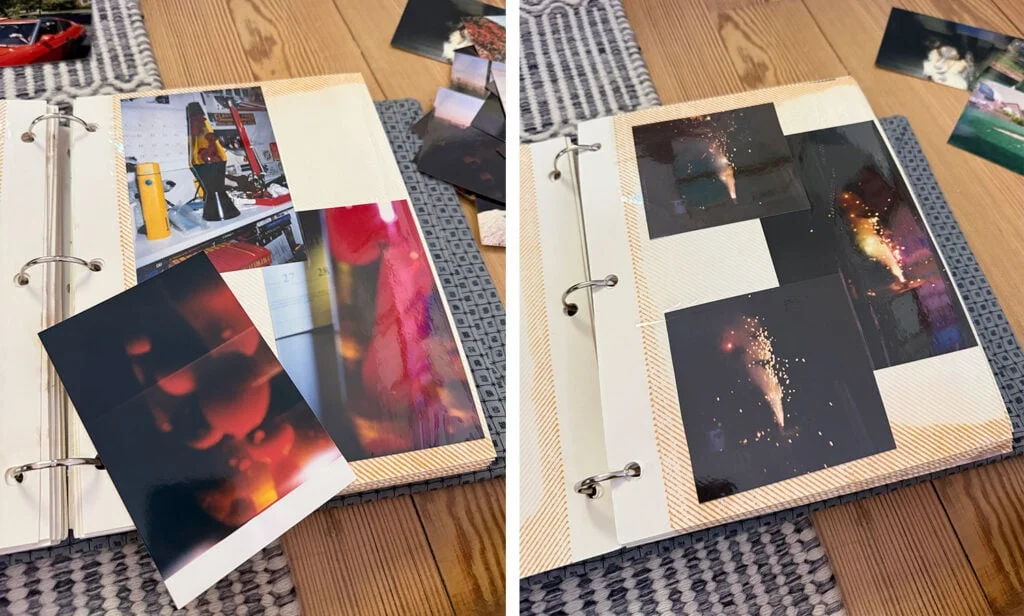
3. Pare down. At the risk of sounding unsentimental: not every old photo deserves to be kept. We’ve found plenty of blurry, dark, duplicate, or just plain unimportant pictures that probably should have been tossed years ago. So we’re going through the albums the same way you’d delete junk from your phone’s camera roll. Some of them went straight into the shredder.
The methods I’m putting to the test
Here’s where it gets fun. I asked for tips on my Instagram stories, and the same photo scanner came up again and again — a thousand people recommended it, honestly. So I’m testing the most-often-suggested methods and sharing the pros and cons of each:
- My iPhone camera, straight up
- My iPhone camera with a special scanning app
- A photo scanner that a thousand people swear by
- The flatbed scanner built into the printer we already own
- A third-party digitization service
Fair warning: I expect there won’t be a clear winner. That’s actually good news — it means different photos will call for different methods. I’ll break down the fastest, cheapest, easiest, and best-quality options in the follow-up.
What happens to the photos once they’re digitized
That part is still a work in progress, because digitizing is where the energy goes first. But the plan is threefold:
- Back everything up on an external hard drive — that’s where our more recent family photos live, too
- Keep a cloud copy, probably in Google Photos, where I can edit the dates on uploads (one by one or in batches) so they sort themselves chronologically
- Print photobooks to replace the albums that feel genuinely worth keeping. Some photos will live on digitally only, and that’s fine
I’ve already started recreating a couple of the albums as Blurb photobooks. It’s more time-consuming than I expected, so we’ll see how many make the cut.
One last tip for anyone chomping at the bit: Miss Freddy is a professional photo organizer who came up constantly in my research. She’s got a ton of free tips on her Instagram, plus e-courses on scanning, organizing, and backing up photos. (That’s not an affiliate link — I’m just a fan of her work.)
Stay tuned. I’m taking notes on everything as I go, and the next post will have the full breakdown.
FAQ
Once the whole project is done. It’ll include my recommendations for the fastest, cheapest, easiest, and best-quality options — with price comparisons, since that’s the part everyone keeps asking about.
No. You can start with your phone camera today. The dedicated scanner is one of the methods I’m testing, not a prerequisite. I’ll share how it compares in the follow-up.
Only the ones that don’t earn their keep. Blurry duplicates, dark shots, photos of things you no longer care about — yes. If you’re torn, keep it. This is about removing the obvious junk, not curating a museum.
A note from Maya
I used to buy the trend first and ask questions later. Same instinct applied to our photo albums: keep them all, no questions asked, until they took over a cabinet. This project is my way of applying the same lesson — buy less (or rather, keep less), and keep the things that actually matter. The lava lamp didn’t make the cut. And honestly? I’ve never felt better about it.
More on home and photos: my
This post contains affiliate links, so I may earn a small commission when you make a purchase through links on this site at no additional cost to you.